Fish Identifier
The fish identification app for curious anglers
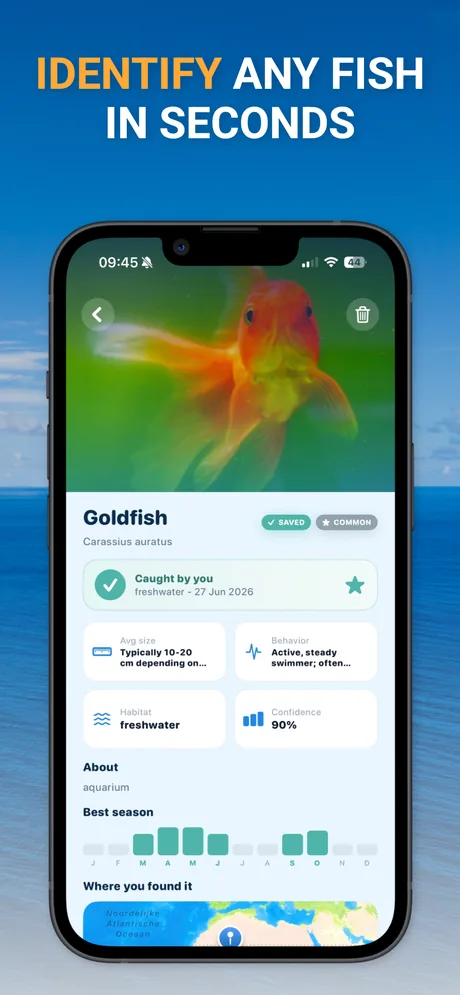
An app to identify fish does one thing brilliantly: it turns a photo into an answer. Fish Identifier for iPhone suggests the species, explains the traits behind the match, and adds habitat, size, and season - so you learn something with every catch.
What does a fish identification app do?
A fish identification app analyzes a photo of a fish and suggests which species it is. Instead of leafing through a field guide, you photograph the fish and the app compares its visible features - body shape, fin placement, tail shape, color, and markings - with known species. Within seconds you see the most likely match, along with the details that let you verify it yourself.
In Fish Identifier, every identification includes:
- Common and scientific name - for example Goldfish, Carassius auratus.
- Typical size and behavior - what the species usually measures and how it acts.
- Habitat type - freshwater, saltwater, or brackish.
- Best season - a month-by-month view of when the species is most active.
- A confidence indicator - how strong the visual match is, so you know when to double-check.
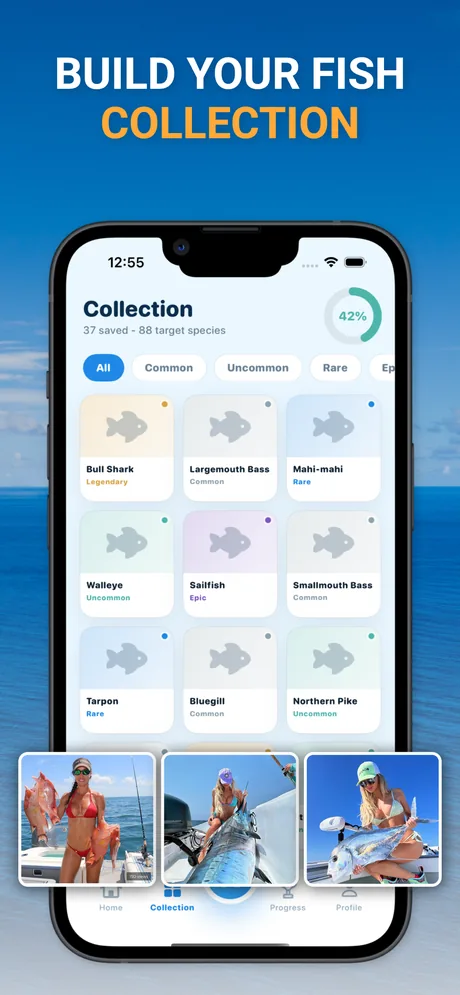
You can then save the result to your collection, mark it as caught, log where you found it, and ask follow-up questions - about anything from the fish’s ecological role to how it is commonly cooked.
Getting a photo the app can work with
Identification quality follows photo quality. Five habits make almost every photo identifiable:
Shoot the side profile
A side-on view shows body shape, fin position, and markings all at once - the marks that separate lookalike species.
Use natural light
Daylight preserves true colors. Flash and deep shadow can hide spots, stripes, and fin edges the analysis relies on.
Spread the fins
Fin shape and ray structure are key field marks. Gently fan the dorsal and tail fin if you can do so safely.
Fill the frame
Get close enough that the fish fills most of the photo, with the head and tail both in view and in focus.
Mind the background
A boat deck, hand, or measuring board works well. Busy backgrounds and water glare make the outline harder to read.
Verify the result
Compare the suggested species’ traits with the fish in front of you. The app shows you what to look for, and follow-up questions are one tap away.
Who uses an app to identify fish?
Anglers
The most common moment: something unexpected on the hook. Is this a blue catfish or a channel cat? A rainbow trout or a small steelhead? A quick photo settles it, and the catch goes straight into your collection with the location and date.
Students and educators
Fish Identifier started as an education app. The species pages read like a friendly field guide - scientific names, habitat, behavior, and seasonality - which makes it a practical companion for biology classes, aquarium visits, and citizen-science projects.
Travelers and food lovers
Fish markets and restaurant menus abroad are full of unfamiliar species. Identify what you are looking at and ask how it is usually prepared, from grilling whole to curing.
Aquarium hobbyists
From a goldfish variant to a saltwater tank resident: photo ID works on the other side of the glass too, as long as reflections are kept out of the shot.
What to look for in a fish identification app
If you are comparing apps to identify fish, judge them on four things:
- Transparent results. A bare species name is hard to trust. Look for apps that show the traits behind the match and a confidence indicator, so you can verify the suggestion against the fish itself.
- Real species information. Identification is the start, not the end. Habitat, size, season, and behavior turn a label into knowledge.
- A way to keep your history. A collection or catch log makes the app more useful every time you fish.
- Coverage of your waters. Make sure the app handles both freshwater and saltwater species if you fish both.
Fish Identifier was designed around exactly these four points - and adds fishing spots, quests, and a per-species “how to find” guide on top.
Fish identification app FAQ
What is the best way to use an app to identify fish?
Photograph the fish from the side, in daylight, with the whole body in frame and the fins as visible as possible. Wet your hands, hold the fish steady, and avoid strong shadows across the body. A clear side profile shows the app the same field marks a biologist would check: body shape, fin position, tail shape, and markings.
Does the Fish Identifier app work offline?
The identification itself needs an internet connection, because the photo analysis runs online. Your saved collection remains available on your device, so you can review earlier identifications wherever you are.
Which fish can the app identify?
The app is built to recognize a broad range of species across freshwater, saltwater, and aquarium environments - from common catches such as bass, trout, catfish, and snapper to aquarium fish such as goldfish. Every result shows the traits behind the suggestion so you can verify it yourself.
Is the app available for Android?
No. Fish Identifier (Fish ID by Photo - Fishy) is currently an iPhone app, available worldwide on the App Store, and requires iOS 18.2 or later.
How much does the app cost?
The download is free and you can try the app at no cost. A subscription unlocks the full premium feature set. Pricing is shown in the app and billed through your Apple ID.
Can the app tell me if a fish is safe to eat?
The app offers general culinary information about how species are commonly prepared, which many users find helpful. It does not replace official guidance: for consumption advisories, size limits, and catch regulations, always check your local authorities.
Try the fish identification app
Download Fish Identifier for iPhone, point your camera at a fish, and see what it is. Species details, your own collection, and fishing spots near you - free to get started.
Free on the App Store for iPhone. A subscription unlocks the full premium feature set.